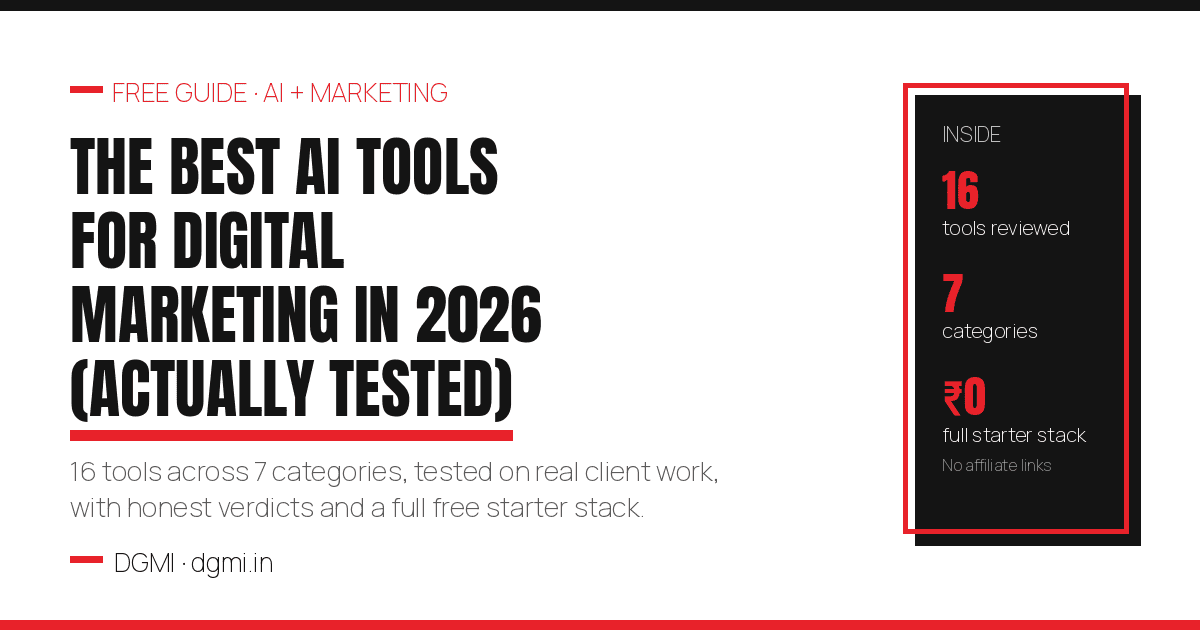
Every “best AI tools” list on the internet has the same problem: the writer has clearly never used half the tools. This list is different for one simple reason: these are the tools we actually run DGMI’s own marketing on, plus the ones our students and client projects have genuinely tested over the past two years. For every tool you get the honest verdict: what it is brilliant at, where it disappoints, whether the free tier is real, and who should skip it. No affiliate links anywhere in this guide, so nothing below is recommended because it pays us. It is recommended because it worked.
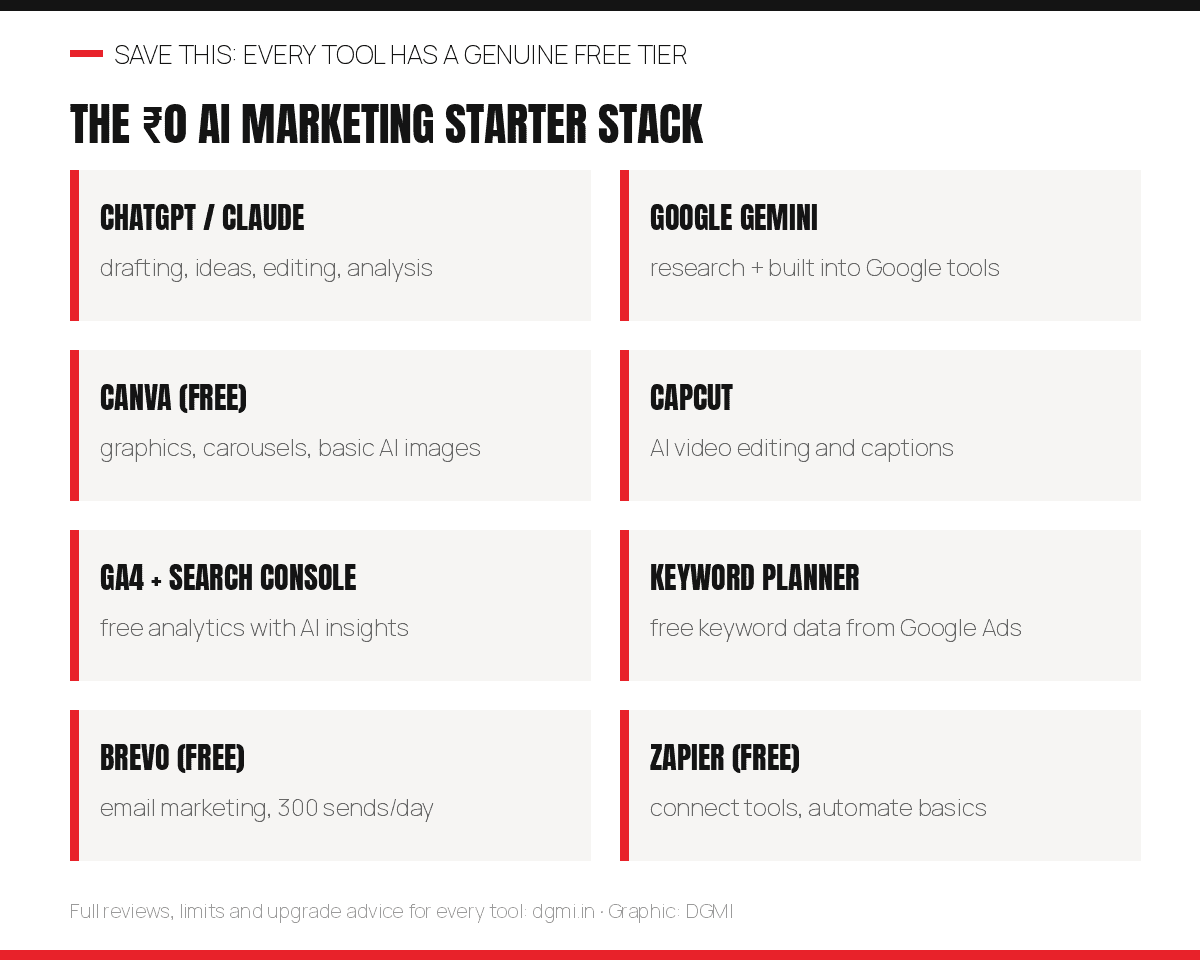
The best AI marketing stack in 2026 for most beginners is: ChatGPT or Claude for content and thinking, Canva for design, CapCut for video, Google’s built-in AI (Keyword Planner, GA4, Performance Max) for search and ads, Brevo for email, and Zapier for automation. Every one of those has a genuine free tier, which means a complete professional AI stack costs ₹0 to start.
• 87% of marketers now use generative AI in at least one workflow, up from 51% in 2024 (Salesforce State of Marketing 2026)
• The average marketer saves 6.1 hours every week with AI; senior practitioners save 8 to 10 (HubSpot AI Trends 2026)
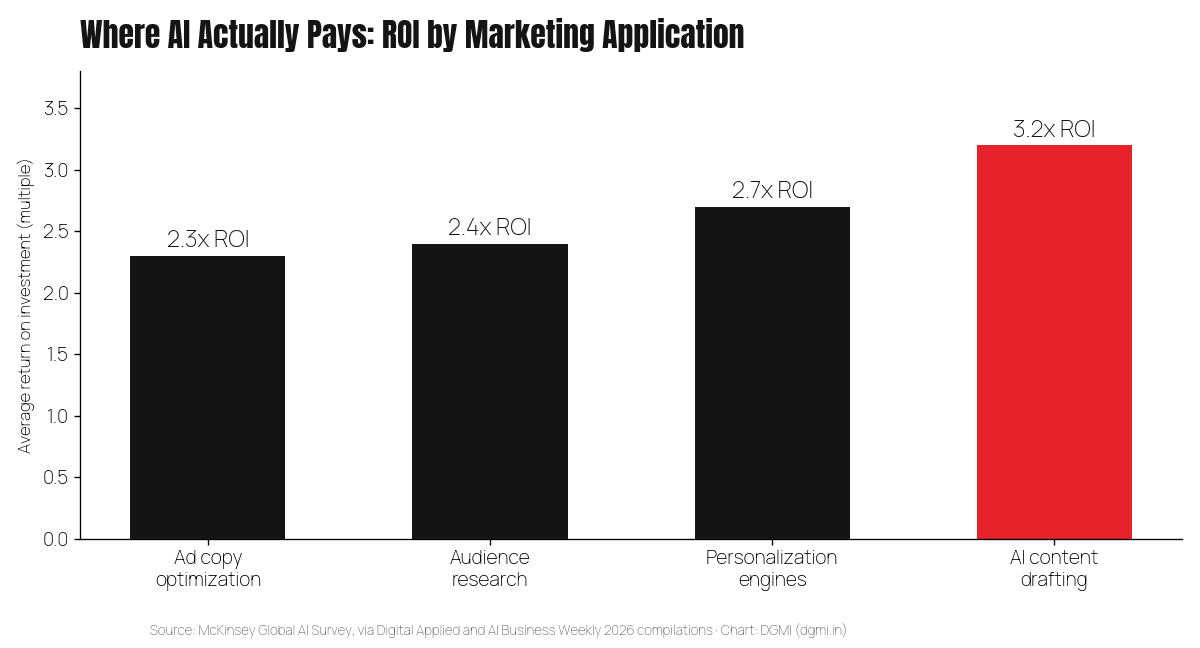
• The payoff is measured: AI content drafting returns 3.2x ROI, personalization 2.7x (McKinsey Global AI Survey)
• And the career stakes are real: AI-skilled marketers earn a 25 to 40% salary premium, while agencies are cutting junior roles that resist AI (Gartner)
1. How We Tested (and the One Rule Before Any Tool)
Our method: every tool below was used on real work: DGMI’s own website, social channels and campaigns, or student and client projects, for a minimum of several weeks. We judged four things: output quality on real tasks (not demos), the honesty of the free tier, the learning curve for a beginner, and value at Indian budgets. Tools that looked impressive in launch videos but wasted time in practice did not make the list. Pricing changes constantly, so treat prices here as mid-2026 reference points and check current pages before paying.
The one rule that decides whether AI tools help or destroy your marketing: AI is an assistant, never a substitute. Google’s March 2026 core update data made this brutally concrete: sites publishing original, verified content gained 22% visibility while AI-paraphrased, experience-free content lost 71% of its traffic. Every tool below multiplies a human who knows what they are doing. None of them replaces the knowing. If you remember one sentence from this guide, make it this one: AI can help you say it; it cannot be the one who knows it. (Our E-E-A-T guide explains exactly how Google separates the two.)
2. AI Assistants: The Foundation of Every Stack
These four cover 80% of a marketer’s AI needs: drafting, editing, research, brainstorming, analysis. HubSpot’s data confirms it: the top marketer uses of AI are brainstorming (62%), summarizing (53%) and drafting (44%). You need one primary assistant; power users run two.
ChatGPT (OpenAI)
What it does: the all-rounder: content drafts, campaign ideas, ad copy variants, data analysis, image generation, and web-connected research.
Our verdict: the best first AI tool for a beginner, full stop. Its answers are fast and versatile, its mobile app is excellent, and the ecosystem (custom GPTs, voice) is the deepest. Weakness: default output has a recognizable “AI flavor” that needs human editing before publishing.
Free tier: genuinely useful with daily limits. Paid: Plus at about $20/month (roughly ₹1,700).
Best for: everyone starting out; social media and ideation work.
Claude (Anthropic)
What it does: long-form writing, editing, and reasoning through complex documents; handles very large inputs (entire reports, transcripts, spreadsheets) in one go.
Our verdict: full transparency: Claude is the assistant we use most at DGMI, precisely for long, structured content and analysis where nuance matters. Its writing needs less de-roboting than any tool we have tested. Weakness: fewer bells and whistles than ChatGPT’s ecosystem.
Free tier: real but capped daily. Paid: Pro at about $20/month.
Best for: bloggers, content marketers, anyone producing long-form work.
Google Gemini
What it does: Google’s assistant, woven into the tools marketers already live in: Docs, Sheets, Gmail, and increasingly Ads and Analytics.
Our verdict: the integration is the product. Drafting an email in Gmail or summarizing a Sheet without switching tabs is a genuine workflow win, and its connection to live Google Search makes it strong for current-events research. Standalone writing quality trails the top two slightly.
Free tier: generous. Paid: bundled via Google One AI plans (about ₹1,950/month in India, varies).
Best for: teams living inside Google Workspace.
Perplexity
What it does: AI search that answers with cited sources, which makes it a research tool rather than a writing tool.
Our verdict: our default for fact-finding: statistics, comparisons, and “what changed recently” checks, because every claim links to its source for verification. It is also the fastest engine to reflect website changes, which makes it the perfect testing ground for the GEO work in our GEO playbook.
Free tier: solid. Paid: Pro at about $20/month.
Best for: research, competitive analysis, sourcing statistics for content.
3. SEO and GEO Tools
Semrush (with AI features)
What it does: the full professional SEO suite: keyword research, competitor analysis, site audits, rank tracking, now with AI-assisted content briefs and an AI visibility toolkit for tracking mentions in AI answers.
Our verdict: the industry-standard choice when a client or employer is paying. For a solo beginner the price is heavy, and 80% of early-career needs are covered by the free stack below. Learn it, but do not feel forced to buy it on day one.
Free tier: limited daily queries. Paid: from about $139/month.
Best for: agencies, in-house teams, freelancers with multiple clients.
Ahrefs
What it does: the other industry-standard suite, famous for the best backlink data in the business, plus AI content grading.
Our verdict: the secret for beginners is Ahrefs Webmaster Tools, which is free for your own verified site and gives you a real site audit plus backlink visibility. That free product alone earns Ahrefs its place on this list.
Free tier: AWT free for your own sites. Paid: from about $129/month.
Best for: link-building work; free audits of your own projects.
The free Google SEO stack (Keyword Planner + Search Console + AI Mode)
What it does: Google gives away the most authoritative data in SEO: Keyword Planner for demand and cost data, Search Console for how your site actually performs (now rolling out the new Generative AI report), and AI Mode itself as a free research lab where you can watch which sources get cited for any query.
Our verdict: this trio is the most underrated “AI SEO tool” in existence and it costs nothing. Our entire keyword research process runs on it.
Free tier: everything. Best for: literally everyone.
4. Design and Image Tools
Canva (Magic Studio)
What it does: the everything design tool: social graphics, carousels, presentations, with AI features for image generation, background removal, resizing across formats and brand kits.
Our verdict: the highest value-per-rupee tool in marketing. A beginner produces professional social creatives on day one, and the AI resize feature alone (one design becomes every platform’s format) pays for the Pro plan in saved hours. Canva’s own research says 80% of creative professionals now use generative AI somewhere in their process; this is where most of them do it.
Free tier: excellent. Paid: Pro in India at roughly ₹500/month or less on annual plans.
Best for: every marketer; social media managers especially.
Ideogram / DALL·E (AI image generation)
What it does: generate original images from text prompts. Ideogram’s specialty is rendering readable text inside images, the historical weakness of AI generators; DALL·E lives inside ChatGPT for convenience.
Our verdict: useful for concept visuals, backgrounds and ad-creative variations. Honest caveat from real use: for branded marketing graphics with exact fonts, colors and layout control, template-based design (Canva) still beats prompt-based generation. Generate raw material with AI; assemble the final branded asset in a design tool.
Free tier: both offer limited free generations. Best for: ad creative variations, blog visuals, concept art.
5. Video Tools
Context first: marketers rank short-form video as the #1 ROI content format (HubSpot 2026), and 91% of businesses now use video (Wyzowl 2026). These two tools get a beginner producing it this week.
CapCut
What it does: full video editing with AI superpowers: auto-captions (critical, since most social video is watched muted), background removal, script-to-video, and direct export formats for Reels and Shorts.
Our verdict: the fastest path from phone footage to professional-looking Reel that exists. The auto-caption accuracy for Indian-accented English is genuinely good. This is the tool we recommend students learn first for video.
Free tier: strong. Paid: Pro unlocks premium effects.
Best for: Reels, Shorts, and every beginner video editor.
HeyGen / OpusClip (specialist picks)
What they do: HeyGen creates presenter-style videos with AI avatars speaking your script (including multilingual dubbing); OpusClip takes one long video and auto-cuts it into scored, captioned short clips.
Our verdict: both are “specific job” tools rather than daily drivers. HeyGen shines for course-style explainers and multilingual variants without reshooting; OpusClip is a repurposing machine for anyone with webinar or podcast footage. Skip both until you actually have those jobs.
Free tiers: limited trials on both. Best for: educators, podcasters, agencies repurposing long content.
🎯 Tools Are Easy. Knowing What to Make Them Do Is the Skill.
DGMI’s Digital Marketing + AI Course teaches the marketing fundamentals AND the AI workflows together: you run SEO, ads, content and automation on a real website, using this exact stack, live and 1:1 with a mentor of 12 years. Try a 100% practical crash course class, FREE this week.
6. Advertising AI
Google Ads AI (Performance Max, AI Max, Smart Bidding)
What it does: Google’s own AI now runs inside every campaign: automated bidding against your conversion goals, asset generation, and Performance Max campaigns that place ads across all Google surfaces automatically.
Our verdict: powerful and dangerous in equal measure. The AI optimizes brilliantly once it has conversion data and guardrails; switched on blind, it happily spends budget learning at your expense. Feed it a proper keyword and negative structure first (our step-by-step guide covers exactly this), then let the machine optimize inside your fences.
Cost: free features inside your ad spend. Best for: every advertiser, with supervision.
Meta Advantage+ (and the Andromeda era)
What it does: Meta’s AI campaign system: automated audiences, placements and creative combinations. Under the hood, Meta’s 2026 “Andromeda” delivery system now reads your creative to decide who sees your ads, making creative variety the new targeting.
Our verdict: Meta’s AI targeting genuinely outperforms manual interest-stacking in most 2026 tests, but it shifts the skill: your job becomes feeding it diverse, high-quality creatives and clean conversion signals. Pair it with an AI creative tool and a testing habit.
Cost: free inside ad spend. Best for: e-commerce and lead-gen advertisers.
AdCreative.ai
What it does: generates ad creative variations at scale, scored by predicted performance.
Our verdict: useful specifically for the Andromeda-era need above: volume and variety of creatives to feed the algorithms. Output quality is good-not-great; treat its top-scored concepts as drafts your brand eye finishes. A convenience, not a necessity.
Free tier: trial only. Paid: from about $39/month.
Best for: performance marketers running many creative tests.
7. Automation, Analytics and Email
GA4 (with AI insights)
What it does: Google Analytics 4, the free measurement backbone, with AI-generated insights, anomaly detection and predictive audiences built in.
Our verdict: not optional. Every other tool on this list gets judged by what GA4 says happened. Learning to read it is worth more to your salary than any generator tool here; analytics fluency carries its own 20 to 30% premium in the 2026 salary data.
Cost: free. Best for: everyone, non-negotiably.
Zapier / Make
What they do: connect your tools so work happens automatically: new lead → CRM entry → WhatsApp notification → email sequence, no code required. Both now include AI steps (summarize, classify, draft) inside automations.
Our verdict: Zapier is easier to learn and better documented; Make is dramatically cheaper at scale and more powerful once you are comfortable. Start on Zapier’s free plan, graduate to Make when your automation count grows. Building three useful automations for a business is also one of the best portfolio pieces a beginner can show.
Free tiers: both real. Paid: Zapier from about $20/month; Make from about $9/month.
Best for: lead-gen workflows, reporting, repetitive-task removal.
Brevo (email + CRM)
What it does: email marketing with AI subject-line and content assistance, automation flows, and a basic CRM, with pricing by emails sent rather than list size.
Our verdict: the most India-friendly starting point for email: the free plan allows 300 sends per day with unlimited contacts, which covers a beginner or small business completely. HubSpot’s free CRM is the step up when you need a full platform; its Breeze AI features are excellent but paid tiers climb steeply.
Free tier: 300 emails/day. Paid: from about ₹1,500/month.
Best for: newsletters, lead nurturing, small business CRM.
8. The Master Comparison Table
| Tool | Category | Free tier? | Paid from (approx.) | Best for |
|---|---|---|---|---|
| ChatGPT | Assistant | Yes, good | $20/mo | First AI tool for anyone |
| Claude | Assistant | Yes, capped | $20/mo | Long-form content, editing |
| Gemini | Assistant | Yes, generous | ~₹1,950/mo | Google Workspace users |
| Perplexity | Research | Yes | $20/mo | Cited research, GEO testing |
| Semrush | SEO suite | Limited | $139/mo | Agencies, multi-client work |
| Ahrefs | SEO suite | AWT free (own site) | $129/mo | Backlinks, free self-audits |
| Google SEO stack | SEO/GEO | Fully free | n/a | Everyone |
| Canva | Design | Yes, excellent | ~₹500/mo | All social creatives |
| Ideogram / DALL·E | Image gen | Limited | $8–20/mo | Ad visuals, concepts |
| CapCut | Video | Yes, strong | Pro optional | Reels and Shorts |
| HeyGen / OpusClip | Video (specialist) | Trials | $29+/mo | Avatars; repurposing |
| Google Ads AI | Ads | Inside ad spend | n/a | All advertisers |
| Meta Advantage+ | Ads | Inside ad spend | n/a | E-commerce, lead gen |
| GA4 | Analytics | Fully free | n/a | Everyone |
| Zapier / Make | Automation | Yes | $9–20/mo | Workflows, reporting |
| Brevo | Email/CRM | 300 emails/day | ~₹1,500/mo | Newsletters, nurturing |
9. The ₹0 Starter Stack + 30-Day Learning Plan
Here is the part most tool lists hide because it sells nothing: a complete, professional AI marketing stack costs zero rupees to start. Save this graphic:
The 30-day plan to actually learn it: Week 1, assistants: use ChatGPT or Claude for one real task daily (a caption set, an email, a content outline), and practice editing the output until it sounds human; save your best prompts in a doc, because that doc becomes your personal toolkit. Week 2, creative: produce five social graphics in Canva and two captioned Reels in CapCut for any real page (yours, a friend’s business, a college club). Week 3, data: install GA4 and Search Console on a site (a free WordPress or Blogger site works), pull keyword data from Keyword Planner, and write down three things the data tells you. Week 4, automation and email: build one Zapier automation and one Brevo welcome email flow. Congratulations: in 30 days you have touched every category above and, more importantly, you now own proof of work, which the salary data shows is what actually moves offers.
10. Turning AI Skills Into Salary and Clients
The market has already priced this skill set: AI-fluent marketers earn 25 to 40% more than peers, and the same Gartner data shows agencies cutting junior roles that consist only of tasks AI now does. The safe and lucrative position is the director’s chair: fundamentals plus AI direction. Three concrete moves capture the premium. One, build an AI-visible portfolio: a before/after of AI-assisted content you edited to human quality, a small ad test where AI creative variations improved CTR, one automation that saved a business real hours; each is a one-page case study. Two, say it in the interview correctly: not “I use ChatGPT” (everyone says this) but “I cut content production time roughly in half using an AI drafting workflow while keeping quality checks human,” which is a system, not a tool name. Three, productize it as a freelancer: small businesses will pay monthly retainers for exactly the starter-stack services above (social creatives, a newsletter, basic automation), and the freelance rate card in our salary guide shows what to charge.
11. The Exact Stack We Run DGMI On
Full transparency, because “tested” should mean something: this website and its marketing run on Claude for long-form drafting and editing (with every fact verified by a human against named sources before publishing, exactly as our E-E-A-T guide demands), Canva plus custom-coded graphics for creatives, GA4 and Search Console for measurement, the free Google stack for keyword and GEO research with Perplexity for cited fact-finding, CapCut for video, and Brevo-class email for the newsletter you can join below any news post. No tool on this page is here because of a commission; several paid tools we tried did not make the list at all. That is the whole review policy.
12. FAQ
Which AI tool should a complete beginner learn first?
ChatGPT or Claude, used daily on real tasks for two weeks. The assistants teach you the core skill every other tool builds on: describing what you want clearly (prompting) and judging output critically (editing). After that, add Canva for design and GA4 for measurement. Resist collecting ten tools in week one; depth on three beats surface on ten in every interview and every client call.
Are paid AI tools worth it, or is free enough?
Free is genuinely enough to learn, build a portfolio and serve a first client; the ₹0 stack above is a complete professional toolkit. Pay when a specific limit blocks real work: assistant usage caps during client projects, Canva brand kits when you manage brand assets, Semrush or Ahrefs when someone else’s site is paying you. The correct order is skills first, subscriptions second.
Will Google penalize my website for using AI content tools?
Google’s policy targets how content is made worthless, not how it is made. AI-assisted content with genuine human experience, verification and editing is explicitly acceptable; AI-substituted content with no added value gets the lowest quality ratings, and the March 2026 core update cost such content 71% of its traffic. Use the tools to draft and accelerate; keep a human as the source of facts, experience and final judgment. Our E-E-A-T guide covers the exact line.
Will AI tools replace digital marketers?
The 2026 data says AI is repricing the work, not removing the worker: 87% of marketers use it, junior execution-only roles are contracting, and AI-fluent professionals earn 25 to 40% premiums. The tasks disappearing are the ones nobody was paid well for anyway. The roles growing are strategy, analysis and AI direction, which is exactly the combination this guide (and honestly, our whole curriculum) points you toward.
How do I keep up as tools change every month?
Follow principles, not launches. The categories in this guide (assistant, design, video, ads, analytics, automation, email) have been stable for years even as tool names churn; master one tool per category and switching later takes a weekend. For the changes that actually matter (algorithm updates, platform policy shifts, new Google features), a single trustworthy news source beats fifty YouTube hot-takes; that is precisely the job of the DGMI News desk.
🚀 Learn Marketing + AI Together, the Way Employers Want It
DGMI’s 3-month Digital Marketing + AI Course (₹29,999) teaches SEO, GEO, Google & Meta Ads, analytics and AI workflows on a real website, live and 1:1, with a worldwide-recognized certification. You graduate with the exact proof of work this guide keeps talking about. Start with a free practical crash course class.
Questions? Contact us · hello@dgmi.in · +91 96940 03464

Sources: HubSpot State of Marketing 2026 statistics hub · Digital Applied: 200+ AI marketing adoption data points (Salesforce, McKinsey, Gartner) · Omnibound: marketing AI adoption statistics 2026 · Searchlab: AI marketing statistics 2026
Continue building: the 2026 salary guide (see what AI skills pay) · the GEO playbook · the Google Ads keyword guide · the E-E-A-T guide (the human half of AI content) · tool and platform news on the DGMI News desk · share your stack in the DGMI Community.
[…] app well rather than five badly. Free and low-cost options are plenty at this stage, and our AI tools guide covers which does what. Use our 100 prompts library (the social and Reels section) to script […]