

Every ‘best free WordPress themes’ list on the internet has the same problem: it was written by looking at other lists. Nobody installed the themes. Nobody checked whether the free version actually includes the header builder in the screenshot, or whether that beautiful demo needs the paid tier to look like the demo. So we did what a beginner cannot easily do alone: installed all ten on the same Hostinger shared plan we use for student sites, built the same five-page site on each, and ran the same six checks. Some results confirmed the reputation. Some did not. Below are the honest verdicts, the scorecard, and the part most lists skip entirely: which theme fits which kind of website, so you pick by goal instead of by screenshot.
| The short answer: For most beginners in 2026, Astra (largest free template library, works with everything) or Kadence (best free header builder for the block editor) is the right first theme. Choose GeneratePress if speed matters above all, Blocksy for the most design freedom free, Neve for the fastest launch, OceanWP or Storefront for a store, Hello Elementor only if you already use Elementor, Twenty Twenty-Six for a simple writer’s site, and Sydney for a portfolio. All ten are free, all ten are fast enough, and all ten run on the self-hosted WordPress explained in our WordPress.com vs WordPress.org guide. |
| THE 2026 THEME LANDSCAPE, IN NUMBERS • Astra and Hello Elementor each pass 1,000,000+ active installs; Kadence and GeneratePress sit at 500,000+; OceanWP around 600,000+; Neve 300,000+ (WordPress.org, September 2026) • GeneratePress generates under 10KB of CSS on a clean install; Astra and Kadence stay under 50KB; all lightweight leaders score 90+ on mobile PageSpeed before caching • A free theme costs Rs 0 forever; premium upgrades run roughly Rs 4,000 to 8,000 a year, and most beginner sites never need them • The default theme shipping with WordPress in 2026 is Twenty Twenty-Six, fully block-based with no front-end JavaScript |
CONTENTS (click to jump)
- How we tested (and why it matters)
- The master scorecard
- Astra
- Kadence
- GeneratePress
- Blocksy
- Neve
- OceanWP
- Hello Elementor
- Twenty Twenty-Six
- Sydney
- Storefront
- Which theme for which website
- How to install or switch a theme safely
- 6 mistakes when choosing a free theme
- Free vs premium: when to pay
- FAQ
How We Tested (And Why It Matters)
Here is exactly what ‘tested’ means in this article, so you can repeat it. Each theme was installed on a fresh WordPress site on the same Hostinger shared plan (about Rs 200 a month, the tier most of our students use). We imported the theme’s own free starter template where one existed, or built a comparable five-page site where it did not, using the same set of photos resized to 1600px. Then we ran six checks.
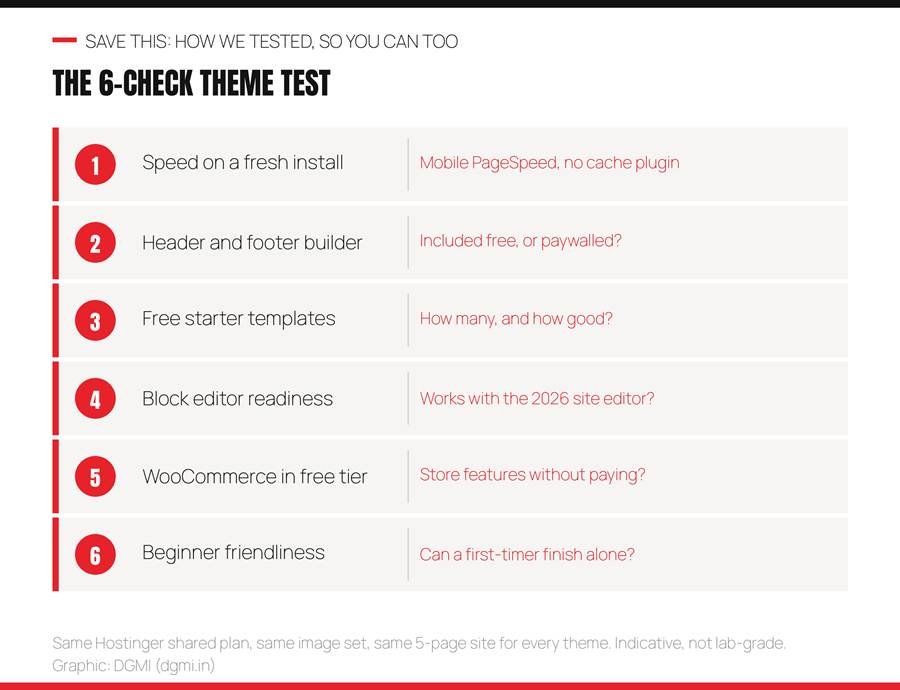
The six checks, applied identically to all ten themes. Graphic: DGMI.
Speed was measured with Google PageSpeed Insights on mobile with no caching plugin installed, to see the theme’s own weight; we report grades (A+ for 95 and above, A for 90 to 95, B+ for 85 to 90) rather than single numbers, because scores vary run to run and your hosting and images will change them. Header and footer builder asks whether the free tier lets you arrange logo, menu and button visually, or locks it. Free templates counts what a beginner can import without paying. Block editor readiness checks how well the theme works with WordPress’s 2026 site editor. WooCommerce in free checks store features without upgrading. Beginner friendliness is the subjective one: could a first-timer finish a site alone? We answered it by watching students try.
One honest note: this is a practical test on real hosting, not a laboratory benchmark. Our goal was to answer the beginner’s question, ‘which of these will actually work for me, free?’, not to declare a millisecond winner.
The Master Scorecard
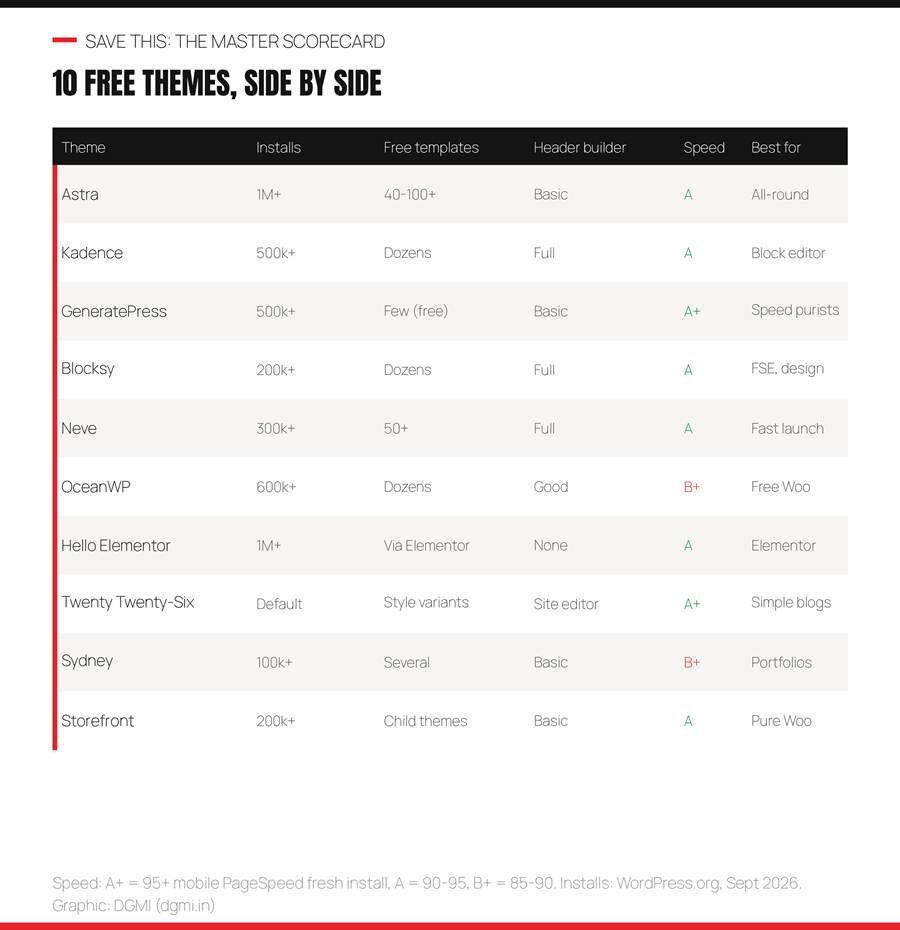
Ten themes, six checks, one card. Install counts from WordPress.org, September 2026. Graphic: DGMI.
| Theme | Installs | Free templates | Header builder (free) | Speed | Best for |
| Astra | 1,000,000+ | 40 to 100+ free (280+ with Pro) | Basic in free; sticky and mega menu in Pro | A (90 to 95 mobile) | First websites, small businesses, client work |
| Kadence | 500,000+ | Dozens free via Kadence Starter Templates | Full drag-and-drop header and footer builder, free | A (95+ common) | Business sites built natively in the block editor |
| GeneratePress | 500,000+ | Few in free; site library is Premium | Basic; advanced elements are Premium | A+ (95+ consistently) | Performance-first sites, developers, cheap hosting |
| Blocksy | 200,000+ | Dozens free, block editor and Elementor | Full header builder with mega menu, free | A (90 to 95) | Design-forward sites using full-site editing |
| Neve | 300,000+ | 50+ starter sites, many free | Header and footer builder, free | A (90 to 95) | Launching fast with minimal decisions |
| OceanWP | 600,000+ | Dozens free demos | Good free options | B+ (85 to 90; heavier than the others) | Online stores on a zero budget |
| Hello Elementor | 1,000,000+ | None in the theme; comes from Elementor’s library | None; you build it in Elementor | A on its own (Elementor adds weight) | People already committed to Elementor |
| Twenty Twenty-Six | Ships with WordPress (1,000,000+) | Style variations rather than templates | Fully editable in the Site Editor | A+ (no front-end JavaScript) | Simple blogs, writers, learning the site editor |
| Sydney | 100,000+ | Several free demos, block editor and Elementor | Basic | B+ (85 to 90) | Freelancers, photographers, agencies |
| Storefront | 200,000+ | Child themes rather than demos | Basic | A (90 to 95) | Pure stores that must never break |
Read the table by columns, not rows: if ‘Header builder’ matters to you, Kadence, Blocksy and Neve win. If ‘Free templates’ matters, Astra and Neve. If ‘Speed’ matters, GeneratePress and Twenty Twenty-Six. The best theme is the one that wins the column you care about.
1. Astra: The Safe Default
| Check | Result |
| Active installs | 1,000,000+ |
| Free templates | 40 to 100+ free (280+ with Pro) |
| Header builder in free | Basic in free; sticky and mega menu in Pro |
| Speed grade (fresh install) | A (90 to 95 mobile) |
| Best for | First websites, small businesses, client work |
Astra is the theme we use on this very website, on client sites, and for every student’s first project, so this verdict comes from years of daily use rather than one afternoon of testing. On our fresh install it loaded cleanly, scored in the low 90s on mobile before any caching, and the free Starter Templates library did what no other theme’s free tier does as well: turned a blank site into a finished design in about thirty seconds.
Where it wins: templates, page builder compatibility (block editor, Spectra, Elementor, Beaver), documentation, and the sheer size of its community, which means every problem you hit has already been answered somewhere. Where it is honest to say it falls short: the free header builder is basic compared to Kadence and Blocksy, and its full-site-editing support is partial rather than native.
Verdict: if you do not know which theme to choose, choose Astra. Our full step-by-step Astra tutorial builds a complete site on it in a weekend.
2. Kadence: Best for the Block Editor
| Check | Result |
| Active installs | 500,000+ |
| Free templates | Dozens free via Kadence Starter Templates |
| Header builder in free | Full drag-and-drop header and footer builder, free |
| Speed grade (fresh install) | A (95+ common) |
| Best for | Business sites built natively in the block editor |
Kadence surprised several of our students who assumed a free theme meant a crippled theme. Its free tier includes a complete drag-and-drop header and footer builder, global color palettes, typography controls and starter templates, all working inside the native WordPress editor with the free Kadence Blocks plugin. On our test it scored the highest mobile PageSpeed of the customizer-based themes.
It shines for people who want to build without Elementor: the Kadence Blocks plugin adds the row, section and advanced blocks that make the block editor feel like a real page builder, while staying light. WooCommerce stores look clean out of the box.
Honest limit: the template library is smaller than Astra’s and leans toward the block editor only. If you are certain you will never touch Elementor, Kadence may be the best free theme on this list; if you want maximum options, Astra edges it.
3. GeneratePress: The Speed Purist
| Check | Result |
| Active installs | 500,000+ |
| Free templates | Few in free; site library is Premium |
| Header builder in free | Basic; advanced elements are Premium |
| Speed grade (fresh install) | A+ (95+ consistently) |
| Best for | Performance-first sites, developers, cheap hosting |
GeneratePress generates under 10KB of CSS on a clean install and it showed: the highest fresh-install speed score in our test, even on a modest shared plan. If you have ever been told your hosting is too slow, GeneratePress is the theme that proves a light theme matters more than expensive servers.
It is deliberately minimal. The free version gives you a clean, stable, fast foundation and a Customizer with sensible controls, then gets out of your way. Its philosophy is modular: add only what you use.
Honest limit for beginners: the free tier has the fewest visual tools and templates on this list, and it does not support full-site editing natively. You will be building pages yourself. Developers love it for exactly that reason; a complete beginner with no design confidence may find Astra or Neve friendlier for a first site.
4. Blocksy: Pro Features, Free Price
| Check | Result |
| Active installs | 200,000+ |
| Free templates | Dozens free, block editor and Elementor |
| Header builder in free | Full header builder with mega menu, free |
| Speed grade (fresh install) | A (90 to 95) |
| Best for | Design-forward sites using full-site editing |
Blocksy is the theme most reviewers were surprised by in 2026, and we were too. Features most themes lock behind a paid tier, a full header builder, mega menu support, custom sidebars, built-in dark mode, strong WooCommerce compatibility, ship in Blocksy’s free version. It is built for full-site editing from the ground up.
On our test it was fast and its Customizer is the most modern-feeling of the group, with a visual interface that beginners found intuitive. If you care about your site looking distinctive without paying, Blocksy gives you the widest free design range.
Honest limit: a smaller community than Astra or Kadence, so fewer tutorials exist when you get stuck, and its rapid feature growth means the interface changes more often. Excellent second theme once you have built one site elsewhere.
5. Neve: Fastest Launch for Beginners
| Check | Result |
| Active installs | 300,000+ |
| Free templates | 50+ starter sites, many free |
| Header builder in free | Header and footer builder, free |
| Speed grade (fresh install) | A (90 to 95) |
| Best for | Launching fast with minimal decisions |
Neve is built around one idea: get a good-looking site live quickly. Its starter sites import cleanly, its header and footer builder is free, and it is mobile-first with AMP compatibility, which showed in a strong mobile score on our test. Several students who felt overwhelmed by Astra’s options finished faster on Neve.
It works with the block editor, Elementor and Beaver Builder, and its templates cover the common Indian small-business cases: restaurants, clinics, consultants, shops.
Honest limit: the middle tier of everything. Not the fastest, not the most customizable, not the biggest library, but well balanced. If speed of launch matters more than long-term flexibility, Neve is a strong pick.
| Test Any Theme With Us, Live, Free DGMI students install, compare and build on these themes in week one, on a site they keep, with a trainer fixing mistakes in real time. See how in a 100% practical crash course class, free this week. Claim My Free Practical Class → |
6. OceanWP: Free WooCommerce Champion
| Check | Result |
| Active installs | 600,000+ |
| Free templates | Dozens free demos |
| Header builder in free | Good free options |
| Speed grade (fresh install) | B+ (85 to 90; heavier than the others) |
| Best for | Online stores on a zero budget |
OceanWP remains the theme that gives store owners the most for free: cart pop-ups, floating add-to-cart bars and product quick views are included in the free version, features most competitors sell. If you are starting a WooCommerce store with no theme budget, this is where you look first.
It is flexible for non-store sites too, with plenty of free demos and a mature Customizer.
Honest limit: it is the heaviest theme on this list. Our fresh-install mobile score sat in the high 80s, below the others, because OceanWP ships more features switched on. Caching and image optimization recover most of that, but if raw speed is your priority, choose Astra or GeneratePress and add store features with plugins.
7. Hello Elementor: The Blank Canvas
| Check | Result |
| Active installs | 1,000,000+ |
| Free templates | None in the theme; comes from Elementor’s library |
| Header builder in free | None; you build it in Elementor |
| Speed grade (fresh install) | A on its own (Elementor adds weight) |
| Best for | People already committed to Elementor |
Hello Elementor is barely a theme at all, and that is the point: it is a near-empty foundation designed to be completely built in the Elementor page builder. On its own it loads in a blink; what you add in Elementor decides the final speed.
Choose it only if you already know and want Elementor. Then everything, header, footer, pages, comes from the builder, which is a coherent way to work and the standard in many agencies.
Honest limit for beginners: it does nothing without Elementor, Elementor’s free tier has become more limited, and the combination is heavier than a block-editor theme. If you are new and undecided, start with Astra or Kadence instead; you can move to Elementor later if a client needs it.
8. Twenty Twenty-Six: The Official Default
| Check | Result |
| Active installs | Ships with WordPress (1,000,000+) |
| Free templates | Style variations rather than templates |
| Header builder in free | Fully editable in the Site Editor |
| Speed grade (fresh install) | A+ (no front-end JavaScript) |
| Best for | Simple blogs, writers, learning the site editor |
Twenty Twenty-Six is the theme WordPress itself ships in 2026, built by the core team, entirely block-based, with no front-end JavaScript and guaranteed compatibility with every future update. It scored top marks for speed on our test and it never breaks, because it is maintained by the people who maintain WordPress.
It is ideal for writers and minimalist blogs: clean typography, generous white space, accessibility built in, and style variations that change the whole look in one click. It is also the best theme for learning how full-site editing works, because everything from header to footer is a block.
Honest limit: design variety. It does not import ready-made business sites; you build layouts from blocks. For a services business wanting a polished multi-page site quickly, Astra or Kadence get you there faster. (If your install shows Twenty Twenty-Five instead, the same verdict applies.)
9. Sydney: The Portfolio Pick
| Check | Result |
| Active installs | 100,000+ |
| Free templates | Several free demos, block editor and Elementor |
| Header builder in free | Basic |
| Speed grade (fresh install) | B+ (85 to 90) |
| Best for | Freelancers, photographers, agencies |
Sydney is the theme students choose when they want their first site to make a visual impression: large hero areas, portfolio layouts and a business-forward look are available free. Its demos are polished, and it works with both the block editor and Elementor.
It suits personal brands, photographers and small agencies where the homepage needs to feel like a statement rather than a brochure.
Honest limit: fewer installs mean a smaller community, and it is a little heavier than the lightweight leaders. A beautiful first impression is worth the trade-off for portfolio sites; for a content-heavy business site, the top four themes are better long-term homes.
10. Storefront: WooCommerce’s Own Theme
| Check | Result |
| Active installs | 200,000+ |
| Free templates | Child themes rather than demos |
| Header builder in free | Basic |
| Speed grade (fresh install) | A (90 to 95) |
| Best for | Pure stores that must never break |
Storefront is built and maintained by the WooCommerce team, which means one thing above all: it will never conflict with WooCommerce. Every update is tested together. For a store owner who values stability over style, that reliability is worth more than any design feature.
It is clean, fast and sensible out of the box, with every WooCommerce element styled correctly on day one.
Honest limit: it is plain, and design flexibility is limited without child themes or extensions. If you want your store to look like a brand rather than a catalogue, OceanWP or Astra with WooCommerce will serve you better. If you want it to just work, Storefront.
Which Theme for Which Website
The mistake nearly every beginner makes is choosing a theme by the demo screenshot. Demos are marketing: the photos, the copy and the spacing were made by designers, and your site will only look like that if you supply equally good content. Choose by what your site must do.
Pick by goal. Graphic: DGMI.
A first-ever website: Astra or Neve, because templates remove the blank-page problem and both have huge beginner communities. A business site you will build in the block editor: Kadence, whose free header builder is the best on the list. Maximum speed on cheap hosting: GeneratePress. A design-forward site using full-site editing: Blocksy. A store with no budget: OceanWP for features, Storefront for stability. You already use Elementor: Hello Elementor. A simple blog or writer’s site: Twenty Twenty-Six, with nothing else to install. A portfolio: Sydney. And if you are pricing a client build, remember that a free theme plus a light builder cuts design cost by more than half, as our WordPress website cost guide explains.
How to Install or Switch a Theme Safely
Installing is four clicks: Appearance > Themes > Add New, search the name, Install, Activate. Switching an existing site is where beginners get hurt, so follow this order.
- Back up first. Your host’s backup or the free UpdraftPlus plugin; a theme switch that goes wrong is a two-minute restore instead of a disaster.
- Preview before activating. Every theme card has a Live Preview button; look at your real pages in the new theme before committing.
- Expect layout changes, not content loss. Posts, pages, images and plugins stay; theme-specific widgets, menus and homepage layouts may need rebuilding.
- Never import a ‘complete site’ template onto an existing site. It overwrites pages and settings; templates are for new sites.
- Check menus, homepage setting and widgets after switching. Appearance > Menus and Settings > Reading are the two places things silently reset.
- Re-run PageSpeed and re-check on your phone. Then compare with the old theme; if the new one is slower, oversized images are usually the cause, not the theme.
For a brand-new site, the whole flow from install to launch is in our Astra theme tutorial, and it applies almost unchanged to Kadence, Neve and Blocksy.
6 Mistakes When Choosing a Free Theme
- Choosing by demo screenshot. Demos are designed by professionals with perfect content. Choose by structure and features.
- Downloading themes from random websites. Only install from WordPress.org or the developer’s official site; ‘free premium theme’ downloads elsewhere are the number one source of hacked WordPress sites, and hacked content is a Google spam policy violation.
- Not checking the free-tier feature list. The header builder, mega menu or store feature in the review may be Pro-only. Our scorecard tells you which.
- Ignoring the last update date. On WordPress.org, a theme not updated in over a year is a security risk and may break with the next WordPress release.
- Installing five themes to ‘try’. Each inactive theme is an update to manage and a security surface; delete the ones you are not using.
- Blaming the theme for slow speed. Nine times out of ten, the cause is 5MB phone photos or twenty plugins. Fix images and plugins first.
Free vs Premium: When to Pay
Every theme on this list has a paid tier, typically Rs 4,000 to 8,000 a year, and every one of them is genuinely usable free. Pay only when a specific feature blocks you: a sticky or transparent header your design needs, a mega menu, WooCommerce extras like quick view, or a template library you will use across many client sites. Freelancers building for clients often find a lifetime or unlimited-site license pays for itself on the first project. Everyone else: put the money into hosting years and a domain, which matter far more, and revisit the question when your site is earning.
FAQ
Which is the best free WordPress theme in 2026?
For most people, Astra (largest free template library and widest compatibility) or Kadence (best free header builder for the block editor). GeneratePress is the fastest, Blocksy the most design-flexible free tier, and Twenty Twenty-Six the most future-proof. The best one is the one that wins the check you care about most; the scorecard above shows which.
Are free WordPress themes safe to use?
Yes, when downloaded from WordPress.org or the developer’s official site, where every theme is reviewed. Never download ‘free’ versions of premium themes from third-party sites; they are the most common way WordPress sites get infected. Also check the last-updated date and prefer actively maintained themes.
Do free themes hurt SEO?
No. The lightweight themes on this list, Astra, Kadence, GeneratePress, Blocksy, Neve, are built for speed and clean code, which helps Core Web Vitals. SEO depends on your content, speed, structure and settings far more than on whether the theme was free; our SEO checklist at dgmi.in/seo-checklist-for-beginners/ covers what actually moves rankings.
What is the fastest free WordPress theme?
GeneratePress on a fresh install, with Twenty Twenty-Six close behind because it ships no front-end JavaScript. Astra, Kadence and Neve are within a few points. In practice, image size and plugin count change speed more than the choice among these five.
Which free theme is best for WooCommerce?
OceanWP includes the most store features free (cart pop-ups, quick view, floating add-to-cart). Storefront, made by the WooCommerce team, is the most stable. Astra and Kadence handle stores cleanly if you also want a strong general-purpose site.
Astra vs Kadence: which should a beginner choose?
Astra if you want the biggest template library and flexibility across builders. Kadence if you will build natively in the block editor and want the best free header builder. Both are fast, well-supported and safe; students finish first sites on either.
Can I change my theme later without losing content?
Yes. Posts, pages, images and plugins survive a theme switch; layouts, menus and widgets may need adjusting. Back up first, use Live Preview, and never import a complete-site template onto an existing site.
Do I need a page builder like Elementor with these themes?
Not in 2026. Kadence, Blocksy, Astra with Spectra, and Twenty Twenty-Six all build professional pages in the native block editor. Elementor is a valid choice if you already know it or a client requires it, but it adds weight and its free tier is more limited than it was.
| Build on the Right Theme, Then Make It Earn DGMI’s 3-month Digital Marketing + AI Course (Rs 29,999) starts with building your own WordPress site on one of these themes, then teaches the SEO, GEO, ads, analytics and AI workflows that turn it into income, live and 1:1, with 9+ real projects and worldwide-recognized certification. Start with a free practical crash course class. Questions: hello@dgmi.in · +91 96940 03464 Explore the Full Course → |
| “I have watched students spend a week choosing a theme and an afternoon building the site. Reverse that. Any of the top four on this list will carry a business for years; DGMI itself runs on a free theme and has never needed more. Pick one in ten minutes using the scorecard, and spend the saved week on the thing that actually brings customers: what you put on the pages.” Himanshu Mulchandani, Founder, DGMI |
Course banner: link to https://dgmi.in/course/#book-demo when publishing.
| About the author Himanshu Mulchandani, Founder and Lead Trainer, DGMI (dgmi.in). 12 years in digital marketing and web development, building and maintaining WordPress sites on Astra, Kadence and other lightweight themes for clients and his own ventures, and 100+ students trained through fully practical, live 1:1 online training. Connect on LinkedIn or Instagram. |
Sources: WordPress.org theme directory (install counts and update dates), Google PageSpeed Insights, GigaPress: best free WordPress themes 2026 (tested), WPForms: best free WordPress themes 2026, TeamUpdraft: best free WordPress themes for 2026. Add rel=”nofollow noopener” to these when publishing.
Keep learning: WordPress.com vs WordPress.org · WordPress website cost in India · Astra theme tutorial · SEO checklist for beginners · GA4, Search Console and Tag Manager guide · 100 AI prompts for marketers · Freelance clients guide · DGMI CommunityEvery ‘best free WordPress themes’ list on the internet has the same problem: it was written by looking at other lists. Nobody installed the themes. Nobody checked whether the free version actually includes the header builder in the screenshot, or whether that beautiful demo needs the paid tier to look like the demo. So we did what a beginner cannot easily do alone: installed all ten on the same Hostinger shared plan we use for student sites, built the same five-page site on each, and ran the same six checks. Some results confirmed the reputation. Some did not. Below are the honest verdicts, the scorecard, and the part most lists skip entirely: which theme fits which kind of website, so you pick by goal instead of by screenshot.
| The short answer: For most beginners in 2026, Astra (largest free template library, works with everything) or Kadence (best free header builder for the block editor) is the right first theme. Choose GeneratePress if speed matters above all, Blocksy for the most design freedom free, Neve for the fastest launch, OceanWP or Storefront for a store, Hello Elementor only if you already use Elementor, Twenty Twenty-Six for a simple writer’s site, and Sydney for a portfolio. All ten are free, all ten are fast enough, and all ten run on the self-hosted WordPress explained in our WordPress.com vs WordPress.org guide. |
| THE 2026 THEME LANDSCAPE, IN NUMBERS • Astra and Hello Elementor each pass 1,000,000+ active installs; Kadence and GeneratePress sit at 500,000+; OceanWP around 600,000+; Neve 300,000+ (WordPress.org, September 2026) • GeneratePress generates under 10KB of CSS on a clean install; Astra and Kadence stay under 50KB; all lightweight leaders score 90+ on mobile PageSpeed before caching • A free theme costs Rs 0 forever; premium upgrades run roughly Rs 4,000 to 8,000 a year, and most beginner sites never need them • The default theme shipping with WordPress in 2026 is Twenty Twenty-Six, fully block-based with no front-end JavaScript |
CONTENTS (click to jump)
- How we tested (and why it matters)
- The master scorecard
- Astra
- Kadence
- GeneratePress
- Blocksy
- Neve
- OceanWP
- Hello Elementor
- Twenty Twenty-Six
- Sydney
- Storefront
- Which theme for which website
- How to install or switch a theme safely
- 6 mistakes when choosing a free theme
- Free vs premium: when to pay
- FAQ
How We Tested (And Why It Matters)
Here is exactly what ‘tested’ means in this article, so you can repeat it. Each theme was installed on a fresh WordPress site on the same Hostinger shared plan (about Rs 200 a month, the tier most of our students use). We imported the theme’s own free starter template where one existed, or built a comparable five-page site where it did not, using the same set of photos resized to 1600px. Then we ran six checks.
The six checks, applied identically to all ten themes. Graphic: DGMI.
Speed was measured with Google PageSpeed Insights on mobile with no caching plugin installed, to see the theme’s own weight; we report grades (A+ for 95 and above, A for 90 to 95, B+ for 85 to 90) rather than single numbers, because scores vary run to run and your hosting and images will change them. Header and footer builder asks whether the free tier lets you arrange logo, menu and button visually, or locks it. Free templates counts what a beginner can import without paying. Block editor readiness checks how well the theme works with WordPress’s 2026 site editor. WooCommerce in free checks store features without upgrading. Beginner friendliness is the subjective one: could a first-timer finish a site alone? We answered it by watching students try.
One honest note: this is a practical test on real hosting, not a laboratory benchmark. Our goal was to answer the beginner’s question, ‘which of these will actually work for me, free?’, not to declare a millisecond winner.
The Master Scorecard
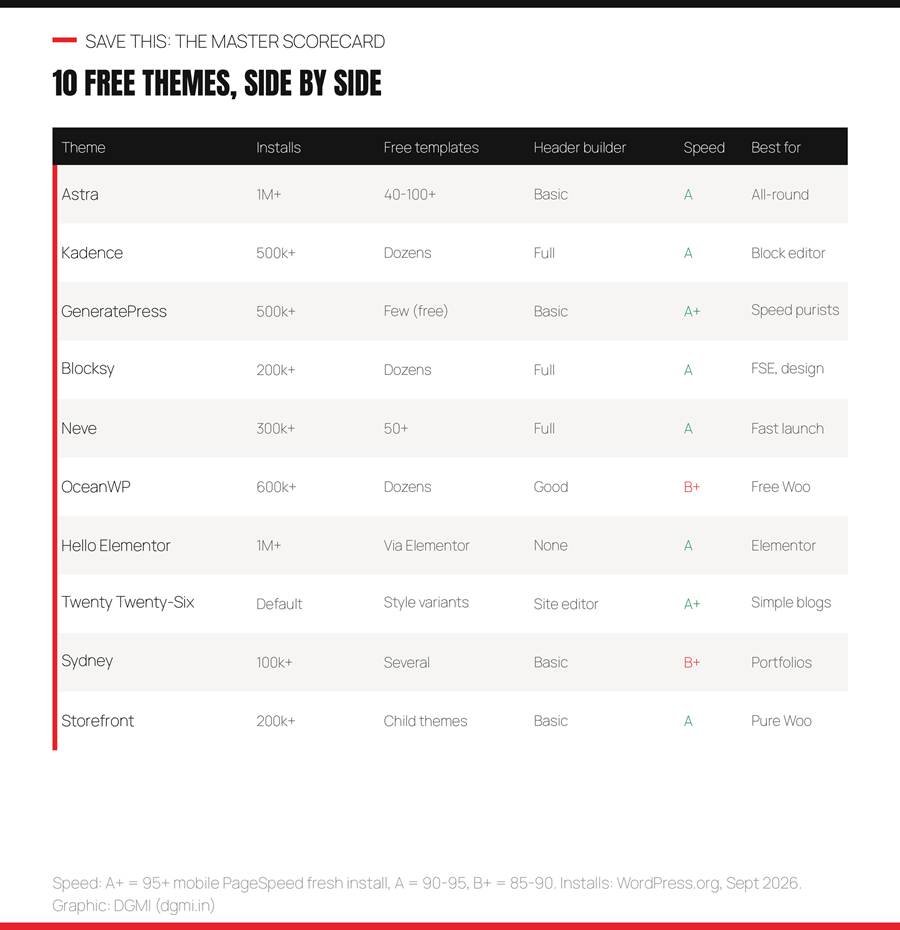
Ten themes, six checks, one card. Install counts from WordPress.org, September 2026. Graphic: DGMI.
| Theme | Installs | Free templates | Header builder (free) | Speed | Best for |
| Astra | 1,000,000+ | 40 to 100+ free (280+ with Pro) | Basic in free; sticky and mega menu in Pro | A (90 to 95 mobile) | First websites, small businesses, client work |
| Kadence | 500,000+ | Dozens free via Kadence Starter Templates | Full drag-and-drop header and footer builder, free | A (95+ common) | Business sites built natively in the block editor |
| GeneratePress | 500,000+ | Few in free; site library is Premium | Basic; advanced elements are Premium | A+ (95+ consistently) | Performance-first sites, developers, cheap hosting |
| Blocksy | 200,000+ | Dozens free, block editor and Elementor | Full header builder with mega menu, free | A (90 to 95) | Design-forward sites using full-site editing |
| Neve | 300,000+ | 50+ starter sites, many free | Header and footer builder, free | A (90 to 95) | Launching fast with minimal decisions |
| OceanWP | 600,000+ | Dozens free demos | Good free options | B+ (85 to 90; heavier than the others) | Online stores on a zero budget |
| Hello Elementor | 1,000,000+ | None in the theme; comes from Elementor’s library | None; you build it in Elementor | A on its own (Elementor adds weight) | People already committed to Elementor |
| Twenty Twenty-Six | Ships with WordPress (1,000,000+) | Style variations rather than templates | Fully editable in the Site Editor | A+ (no front-end JavaScript) | Simple blogs, writers, learning the site editor |
| Sydney | 100,000+ | Several free demos, block editor and Elementor | Basic | B+ (85 to 90) | Freelancers, photographers, agencies |
| Storefront | 200,000+ | Child themes rather than demos | Basic | A (90 to 95) | Pure stores that must never break |
Read the table by columns, not rows: if ‘Header builder’ matters to you, Kadence, Blocksy and Neve win. If ‘Free templates’ matters, Astra and Neve. If ‘Speed’ matters, GeneratePress and Twenty Twenty-Six. The best theme is the one that wins the column you care about.
1. Astra: The Safe Default
| Check | Result |
| Active installs | 1,000,000+ |
| Free templates | 40 to 100+ free (280+ with Pro) |
| Header builder in free | Basic in free; sticky and mega menu in Pro |
| Speed grade (fresh install) | A (90 to 95 mobile) |
| Best for | First websites, small businesses, client work |
Astra is the theme we use on this very website, on client sites, and for every student’s first project, so this verdict comes from years of daily use rather than one afternoon of testing. On our fresh install it loaded cleanly, scored in the low 90s on mobile before any caching, and the free Starter Templates library did what no other theme’s free tier does as well: turned a blank site into a finished design in about thirty seconds.
Where it wins: templates, page builder compatibility (block editor, Spectra, Elementor, Beaver), documentation, and the sheer size of its community, which means every problem you hit has already been answered somewhere. Where it is honest to say it falls short: the free header builder is basic compared to Kadence and Blocksy, and its full-site-editing support is partial rather than native.
Verdict: if you do not know which theme to choose, choose Astra. Our full step-by-step Astra tutorial builds a complete site on it in a weekend.
2. Kadence: Best for the Block Editor
| Check | Result |
| Active installs | 500,000+ |
| Free templates | Dozens free via Kadence Starter Templates |
| Header builder in free | Full drag-and-drop header and footer builder, free |
| Speed grade (fresh install) | A (95+ common) |
| Best for | Business sites built natively in the block editor |
Kadence surprised several of our students who assumed a free theme meant a crippled theme. Its free tier includes a complete drag-and-drop header and footer builder, global color palettes, typography controls and starter templates, all working inside the native WordPress editor with the free Kadence Blocks plugin. On our test it scored the highest mobile PageSpeed of the customizer-based themes.
It shines for people who want to build without Elementor: the Kadence Blocks plugin adds the row, section and advanced blocks that make the block editor feel like a real page builder, while staying light. WooCommerce stores look clean out of the box.
Honest limit: the template library is smaller than Astra’s and leans toward the block editor only. If you are certain you will never touch Elementor, Kadence may be the best free theme on this list; if you want maximum options, Astra edges it.
3. GeneratePress: The Speed Purist
| Check | Result |
| Active installs | 500,000+ |
| Free templates | Few in free; site library is Premium |
| Header builder in free | Basic; advanced elements are Premium |
| Speed grade (fresh install) | A+ (95+ consistently) |
| Best for | Performance-first sites, developers, cheap hosting |
GeneratePress generates under 10KB of CSS on a clean install and it showed: the highest fresh-install speed score in our test, even on a modest shared plan. If you have ever been told your hosting is too slow, GeneratePress is the theme that proves a light theme matters more than expensive servers.
It is deliberately minimal. The free version gives you a clean, stable, fast foundation and a Customizer with sensible controls, then gets out of your way. Its philosophy is modular: add only what you use.
Honest limit for beginners: the free tier has the fewest visual tools and templates on this list, and it does not support full-site editing natively. You will be building pages yourself. Developers love it for exactly that reason; a complete beginner with no design confidence may find Astra or Neve friendlier for a first site.
4. Blocksy: Pro Features, Free Price
| Check | Result |
| Active installs | 200,000+ |
| Free templates | Dozens free, block editor and Elementor |
| Header builder in free | Full header builder with mega menu, free |
| Speed grade (fresh install) | A (90 to 95) |
| Best for | Design-forward sites using full-site editing |
Blocksy is the theme most reviewers were surprised by in 2026, and we were too. Features most themes lock behind a paid tier, a full header builder, mega menu support, custom sidebars, built-in dark mode, strong WooCommerce compatibility, ship in Blocksy’s free version. It is built for full-site editing from the ground up.
On our test it was fast and its Customizer is the most modern-feeling of the group, with a visual interface that beginners found intuitive. If you care about your site looking distinctive without paying, Blocksy gives you the widest free design range.
Honest limit: a smaller community than Astra or Kadence, so fewer tutorials exist when you get stuck, and its rapid feature growth means the interface changes more often. Excellent second theme once you have built one site elsewhere.
5. Neve: Fastest Launch for Beginners
| Check | Result |
| Active installs | 300,000+ |
| Free templates | 50+ starter sites, many free |
| Header builder in free | Header and footer builder, free |
| Speed grade (fresh install) | A (90 to 95) |
| Best for | Launching fast with minimal decisions |
Neve is built around one idea: get a good-looking site live quickly. Its starter sites import cleanly, its header and footer builder is free, and it is mobile-first with AMP compatibility, which showed in a strong mobile score on our test. Several students who felt overwhelmed by Astra’s options finished faster on Neve.
It works with the block editor, Elementor and Beaver Builder, and its templates cover the common Indian small-business cases: restaurants, clinics, consultants, shops.
Honest limit: the middle tier of everything. Not the fastest, not the most customizable, not the biggest library, but well balanced. If speed of launch matters more than long-term flexibility, Neve is a strong pick.
| Test Any Theme With Us, Live, Free DGMI students install, compare and build on these themes in week one, on a site they keep, with a trainer fixing mistakes in real time. See how in a 100% practical crash course class, free this week. Claim My Free Practical Class → |
6. OceanWP: Free WooCommerce Champion
| Check | Result |
| Active installs | 600,000+ |
| Free templates | Dozens free demos |
| Header builder in free | Good free options |
| Speed grade (fresh install) | B+ (85 to 90; heavier than the others) |
| Best for | Online stores on a zero budget |
OceanWP remains the theme that gives store owners the most for free: cart pop-ups, floating add-to-cart bars and product quick views are included in the free version, features most competitors sell. If you are starting a WooCommerce store with no theme budget, this is where you look first.
It is flexible for non-store sites too, with plenty of free demos and a mature Customizer.
Honest limit: it is the heaviest theme on this list. Our fresh-install mobile score sat in the high 80s, below the others, because OceanWP ships more features switched on. Caching and image optimization recover most of that, but if raw speed is your priority, choose Astra or GeneratePress and add store features with plugins.
7. Hello Elementor: The Blank Canvas
| Check | Result |
| Active installs | 1,000,000+ |
| Free templates | None in the theme; comes from Elementor’s library |
| Header builder in free | None; you build it in Elementor |
| Speed grade (fresh install) | A on its own (Elementor adds weight) |
| Best for | People already committed to Elementor |
Hello Elementor is barely a theme at all, and that is the point: it is a near-empty foundation designed to be completely built in the Elementor page builder. On its own it loads in a blink; what you add in Elementor decides the final speed.
Choose it only if you already know and want Elementor. Then everything, header, footer, pages, comes from the builder, which is a coherent way to work and the standard in many agencies.
Honest limit for beginners: it does nothing without Elementor, Elementor’s free tier has become more limited, and the combination is heavier than a block-editor theme. If you are new and undecided, start with Astra or Kadence instead; you can move to Elementor later if a client needs it.
8. Twenty Twenty-Six: The Official Default
| Check | Result |
| Active installs | Ships with WordPress (1,000,000+) |
| Free templates | Style variations rather than templates |
| Header builder in free | Fully editable in the Site Editor |
| Speed grade (fresh install) | A+ (no front-end JavaScript) |
| Best for | Simple blogs, writers, learning the site editor |
Twenty Twenty-Six is the theme WordPress itself ships in 2026, built by the core team, entirely block-based, with no front-end JavaScript and guaranteed compatibility with every future update. It scored top marks for speed on our test and it never breaks, because it is maintained by the people who maintain WordPress.
It is ideal for writers and minimalist blogs: clean typography, generous white space, accessibility built in, and style variations that change the whole look in one click. It is also the best theme for learning how full-site editing works, because everything from header to footer is a block.
Honest limit: design variety. It does not import ready-made business sites; you build layouts from blocks. For a services business wanting a polished multi-page site quickly, Astra or Kadence get you there faster. (If your install shows Twenty Twenty-Five instead, the same verdict applies.)
9. Sydney: The Portfolio Pick
| Check | Result |
| Active installs | 100,000+ |
| Free templates | Several free demos, block editor and Elementor |
| Header builder in free | Basic |
| Speed grade (fresh install) | B+ (85 to 90) |
| Best for | Freelancers, photographers, agencies |
Sydney is the theme students choose when they want their first site to make a visual impression: large hero areas, portfolio layouts and a business-forward look are available free. Its demos are polished, and it works with both the block editor and Elementor.
It suits personal brands, photographers and small agencies where the homepage needs to feel like a statement rather than a brochure.
Honest limit: fewer installs mean a smaller community, and it is a little heavier than the lightweight leaders. A beautiful first impression is worth the trade-off for portfolio sites; for a content-heavy business site, the top four themes are better long-term homes.
10. Storefront: WooCommerce’s Own Theme
| Check | Result |
| Active installs | 200,000+ |
| Free templates | Child themes rather than demos |
| Header builder in free | Basic |
| Speed grade (fresh install) | A (90 to 95) |
| Best for | Pure stores that must never break |
Storefront is built and maintained by the WooCommerce team, which means one thing above all: it will never conflict with WooCommerce. Every update is tested together. For a store owner who values stability over style, that reliability is worth more than any design feature.
It is clean, fast and sensible out of the box, with every WooCommerce element styled correctly on day one.
Honest limit: it is plain, and design flexibility is limited without child themes or extensions. If you want your store to look like a brand rather than a catalogue, OceanWP or Astra with WooCommerce will serve you better. If you want it to just work, Storefront.
Which Theme for Which Website
The mistake nearly every beginner makes is choosing a theme by the demo screenshot. Demos are marketing: the photos, the copy and the spacing were made by designers, and your site will only look like that if you supply equally good content. Choose by what your site must do.
Pick by goal. Graphic: DGMI.
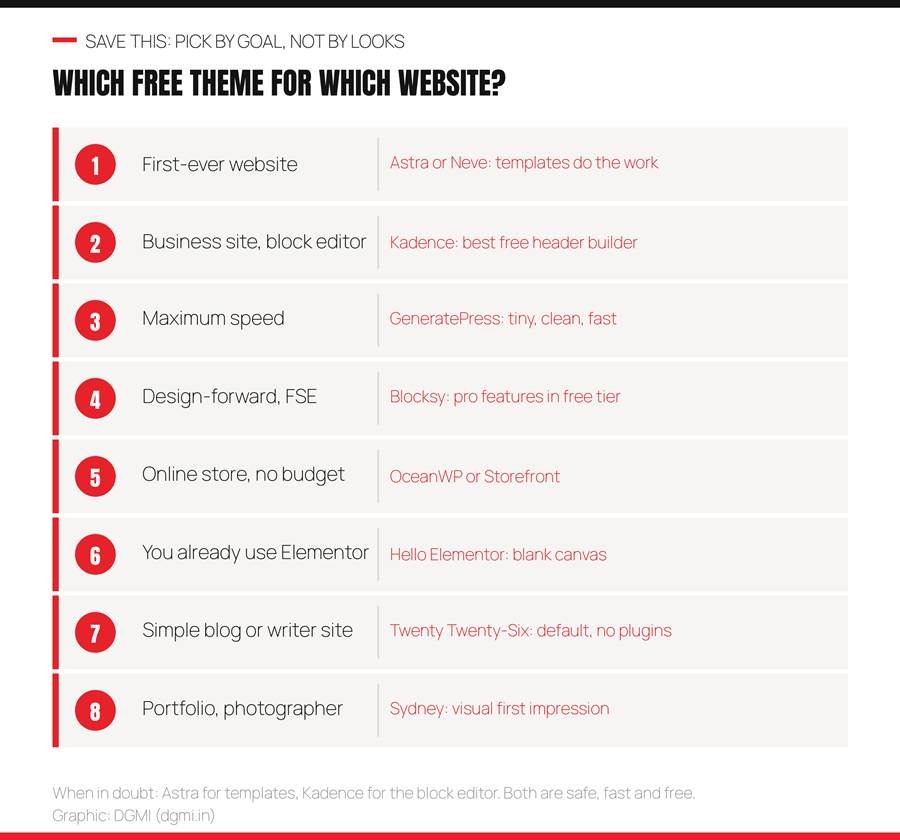
A first-ever website: Astra or Neve, because templates remove the blank-page problem and both have huge beginner communities. A business site you will build in the block editor: Kadence, whose free header builder is the best on the list. Maximum speed on cheap hosting: GeneratePress. A design-forward site using full-site editing: Blocksy. A store with no budget: OceanWP for features, Storefront for stability. You already use Elementor: Hello Elementor. A simple blog or writer’s site: Twenty Twenty-Six, with nothing else to install. A portfolio: Sydney. And if you are pricing a client build, remember that a free theme plus a light builder cuts design cost by more than half, as our WordPress website cost guide explains.
How to Install or Switch a Theme Safely
Installing is four clicks: Appearance > Themes > Add New, search the name, Install, Activate. Switching an existing site is where beginners get hurt, so follow this order.
- Back up first. Your host’s backup or the free UpdraftPlus plugin; a theme switch that goes wrong is a two-minute restore instead of a disaster.
- Preview before activating. Every theme card has a Live Preview button; look at your real pages in the new theme before committing.
- Expect layout changes, not content loss. Posts, pages, images and plugins stay; theme-specific widgets, menus and homepage layouts may need rebuilding.
- Never import a ‘complete site’ template onto an existing site. It overwrites pages and settings; templates are for new sites.
- Check menus, homepage setting and widgets after switching. Appearance > Menus and Settings > Reading are the two places things silently reset.
- Re-run PageSpeed and re-check on your phone. Then compare with the old theme; if the new one is slower, oversized images are usually the cause, not the theme.
For a brand-new site, the whole flow from install to launch is in our Astra theme tutorial, and it applies almost unchanged to Kadence, Neve and Blocksy.
6 Mistakes When Choosing a Free Theme
- Choosing by demo screenshot. Demos are designed by professionals with perfect content. Choose by structure and features.
- Downloading themes from random websites. Only install from WordPress.org or the developer’s official site; ‘free premium theme’ downloads elsewhere are the number one source of hacked WordPress sites, and hacked content is a Google spam policy violation.
- Not checking the free-tier feature list. The header builder, mega menu or store feature in the review may be Pro-only. Our scorecard tells you which.
- Ignoring the last update date. On WordPress.org, a theme not updated in over a year is a security risk and may break with the next WordPress release.
- Installing five themes to ‘try’. Each inactive theme is an update to manage and a security surface; delete the ones you are not using.
- Blaming the theme for slow speed. Nine times out of ten, the cause is 5MB phone photos or twenty plugins. Fix images and plugins first.
Free vs Premium: When to Pay
Every theme on this list has a paid tier, typically Rs 4,000 to 8,000 a year, and every one of them is genuinely usable free. Pay only when a specific feature blocks you: a sticky or transparent header your design needs, a mega menu, WooCommerce extras like quick view, or a template library you will use across many client sites. Freelancers building for clients often find a lifetime or unlimited-site license pays for itself on the first project. Everyone else: put the money into hosting years and a domain, which matter far more, and revisit the question when your site is earning.
FAQ
Which is the best free WordPress theme in 2026?
For most people, Astra (largest free template library and widest compatibility) or Kadence (best free header builder for the block editor). GeneratePress is the fastest, Blocksy the most design-flexible free tier, and Twenty Twenty-Six the most future-proof. The best one is the one that wins the check you care about most; the scorecard above shows which.
Are free WordPress themes safe to use?
Yes, when downloaded from WordPress.org or the developer’s official site, where every theme is reviewed. Never download ‘free’ versions of premium themes from third-party sites; they are the most common way WordPress sites get infected. Also check the last-updated date and prefer actively maintained themes.
Do free themes hurt SEO?
No. The lightweight themes on this list, Astra, Kadence, GeneratePress, Blocksy, Neve, are built for speed and clean code, which helps Core Web Vitals. SEO depends on your content, speed, structure and settings far more than on whether the theme was free; our SEO checklist at dgmi.in/seo-checklist-for-beginners/ covers what actually moves rankings.
What is the fastest free WordPress theme?
GeneratePress on a fresh install, with Twenty Twenty-Six close behind because it ships no front-end JavaScript. Astra, Kadence and Neve are within a few points. In practice, image size and plugin count change speed more than the choice among these five.
Which free theme is best for WooCommerce?
OceanWP includes the most store features free (cart pop-ups, quick view, floating add-to-cart). Storefront, made by the WooCommerce team, is the most stable. Astra and Kadence handle stores cleanly if you also want a strong general-purpose site.
Astra vs Kadence: which should a beginner choose?
Astra if you want the biggest template library and flexibility across builders. Kadence if you will build natively in the block editor and want the best free header builder. Both are fast, well-supported and safe; students finish first sites on either.
Can I change my theme later without losing content?
Yes. Posts, pages, images and plugins survive a theme switch; layouts, menus and widgets may need adjusting. Back up first, use Live Preview, and never import a complete-site template onto an existing site.
Do I need a page builder like Elementor with these themes?
Not in 2026. Kadence, Blocksy, Astra with Spectra, and Twenty Twenty-Six all build professional pages in the native block editor. Elementor is a valid choice if you already know it or a client requires it, but it adds weight and its free tier is more limited than it was.
| Build on the Right Theme, Then Make It Earn DGMI’s 3-month Digital Marketing + AI Course (Rs 29,999) starts with building your own WordPress site on one of these themes, then teaches the SEO, GEO, ads, analytics and AI workflows that turn it into income, live and 1:1, with 9+ real projects and worldwide-recognized certification. Start with a free practical crash course class. Questions: hello@dgmi.in · +91 96940 03464 Explore the Full Course → |
| “I have watched students spend a week choosing a theme and an afternoon building the site. Reverse that. Any of the top four on this list will carry a business for years; DGMI itself runs on a free theme and has never needed more. Pick one in ten minutes using the scorecard, and spend the saved week on the thing that actually brings customers: what you put on the pages.” Himanshu Mulchandani, Founder, DGMI |

Course banner: link to https://dgmi.in/course/#book-demo when publishing.
| About the author Himanshu Mulchandani, Founder and Lead Trainer, DGMI (dgmi.in). 12 years in digital marketing and web development, building and maintaining WordPress sites on Astra, Kadence and other lightweight themes for clients and his own ventures, and 100+ students trained through fully practical, live 1:1 online training. Connect on LinkedIn or Instagram. |
Sources: WordPress.org theme directory (install counts and update dates), Google PageSpeed Insights, GigaPress: best free WordPress themes 2026 (tested), WPForms: best free WordPress themes 2026, TeamUpdraft: best free WordPress themes for 2026. Add rel=”nofollow noopener” to these when publishing.
Keep learning: WordPress.com vs WordPress.org · WordPress website cost in India · Astra theme tutorial · SEO checklist for beginners · GA4, Search Console and Tag Manager guide · 100 AI prompts for marketers · Freelance clients guide · DGMI Community